When you are building your checklist, you will notice that you can add a score value to the following question types:
Why is scoring your checklist questions important?
The scored results on a checklist allow your organization to:
- Easily interpret the performance of a location
- Measure each location's performance when compared to other individual locations
- Measure each location's performance against the aggregate results for all locations (or a subset of locations) in your organization
Using IntouchIntelligence reports, dashboards, and other available features, scored results can - among other things - be used to analyze trends over time, set benchmarks, generate trigger notifications, and determine where additional training might be beneficial.
Point values should be applied to all questions on a checklist that measures a standard.
This will allow you to see:
- An overall score for the check, which will indicate, at a glance, how the location performed
- Checklist outcomes (e.g. pass or fail) are impacted by the overall score
- Section scores for the check (assuming you have more than one section on the checklist)
- For example, you might have a Cleanliness section, Merchandising section, Exterior section, etc., and the scores for each will represent the aggregate results of all the scored questions in that section
- Question-level scores
The point value you assign to each question should be based on the importance of the standard that is being measured.
For example, you might set all questions related to current promotional signage at 1 point, and any questions measuring critical standards, such as customer or employee safety, at 5 points.
Questions with higher point values will, of course, have a greater impact on the overall and section scores of your checklist.
Setting up question-level scoring is easy!
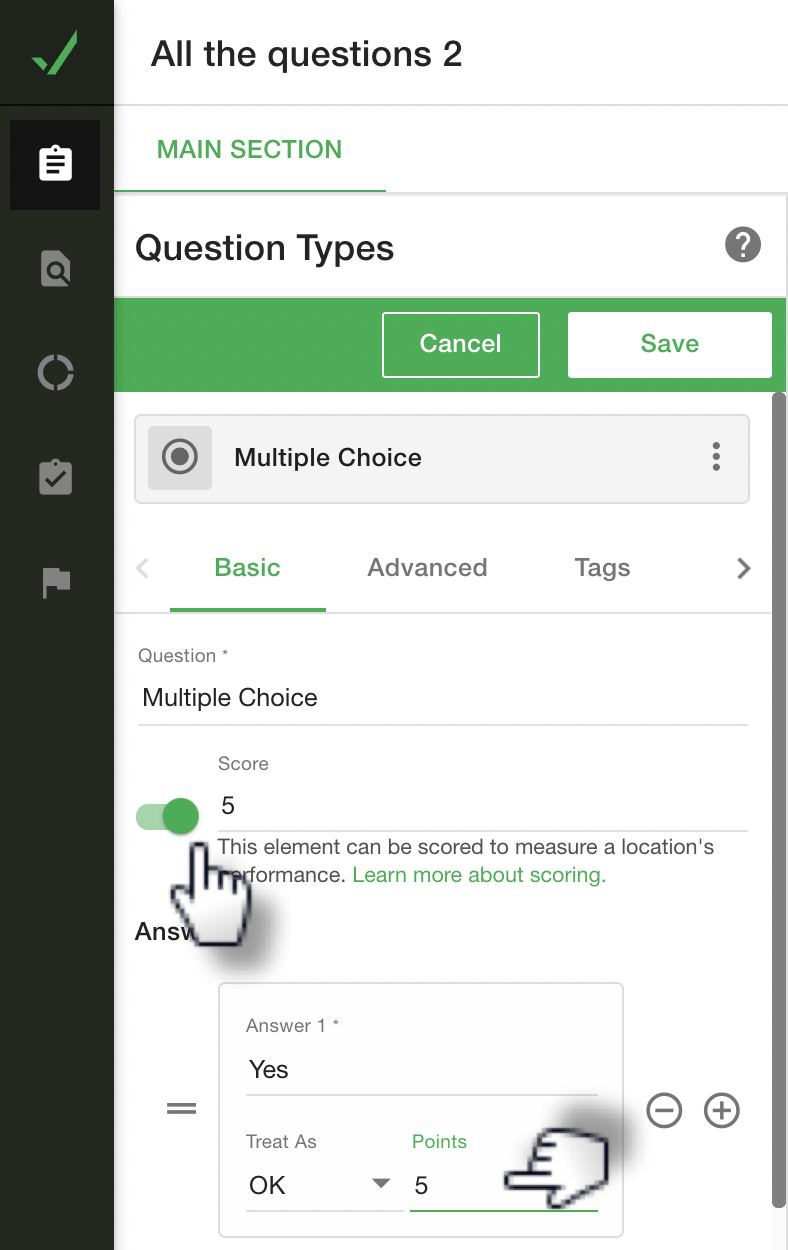
When setting the score parameters on a question, you will indicate the score value (i.e. points possible) for the question, as well as a point value for each of the answer options on that question.
For example, a question could have a score value of 1, with a Yes response valued at 1 point, and a No response valued at 0 points.
Or your scoring methodology might be more complex for some questions. You could have a question with a score value of 5, one response valued at 5 points, another at 3 points, and a third at 0 points.
On Checkboxes questions that allow the checker to select multiple responses, the response point values will accumulate up to the maximum value for that question, but will not exceed the question score value.
On questions that allow only a single response, you should always have at least one response that is valued at the score value for the question, or, on a Checkboxes question where multiple responses can be selected, response values should have the potential to achieve the full score value.
Below, the question Score value and the response Points value are indicated.