|
Question Randomization You can select a subset of questions to be randomly asked during a check, and present one or more of those questions to the checker during each check. This feature gives you the ability to regularly (but not always) collect data and monitor results for specific items. Depending on the results you see over time, you may decide that a specific question needs to be asked on all checks, or not at all. This feature also allows you to keep the number of questions on your checks to a minimum, while still regularly evaluating all the standards that are critical to the success of your business. |
To access the question randomization settings, navigate to IntouchCheck.
- Click on Manage Checklists in the navigation menu to go to the Checklists page
- Click on the checklist to open the form input screen
- In the form input interface, click on the settings icon
- Click on Randomization
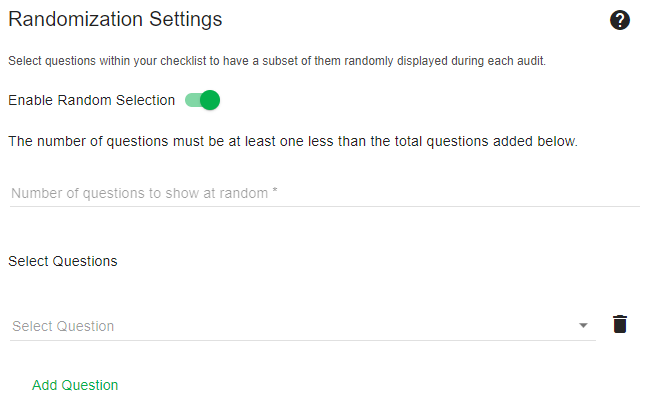
The following options are available in the Randomization settings for a checklist:
| Enable Random Selection: | Toggle this setting to set up a random question selection. |
| The number of questions to show at random: |
Indicate how many of your random questions should be presented on the checklist during a check. E.g. You might want to ask one of your random questions during each check for that checklist. |
| Select Questions: |
From the drop-down menu, select all the questions that will make up the subset of random questions on the checklist. Click on Add Question to select additional questions. |
When you have applied all required settings, click on Save.