
With the Date Picker question type, checkers can select a specific date from a calendar.
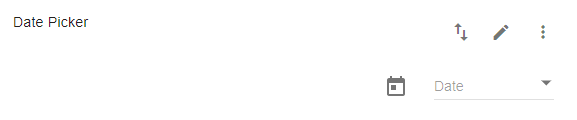
The following features/fields are available when setting up a Date Picker question:
|
Question Label: |
Enter the Question Label... in other words, your question text. |  |
| Hide From Reporting: | If you do not want the question to be visible in IQ to all users, click the Hide From Reporting checkboxes. Only users with permission to view hidden fields will be able to view the question. |  |
| Allow "Not Applicable" and "Cannot Check" Responses: | Click this box to enable not applicable and cannot check if the question is not always applicable for a location or checker. | |
| Logic: | If the question should hide/show based on the response to a question on your checklist, or based on a node, attribute, or tag that has been applied to the location node, click on Add Logic to set up the conditions for the skip pattern. |  |
| Auto-Fill: | Use Auto-Fill to pre-populate a question with a date. This can be used to add/subtract the number of days/weeks/months/years between the inputted date and the pre-populated one. |  |
| Additional Instructions: | If you have any Additional Instructions the checker should be aware of when making the observation, provide the explanation here. Then, they can click to see the additional information on the form while they are completing the check. |  |
| Add Example Photo: | Located under Additional Instructions you can also Add an Example Photo to provide the checker with a visual representation they can refer to while completing the audit. |  |
Click on Save when you are done configuring your question.